Switch Between Monthly and Annual Billing
Please note: You must be logged in as the account owner to switch your billing.
If you’re a monthly subscriber looking for great savings, you can move to annual billing at any time and get two free months.
To get started, open the navigation bar, click on your name in the bottom left corner, then select Billing from the menu.

Click on Account Options in the top right corner and select Switch to Annual Billing.
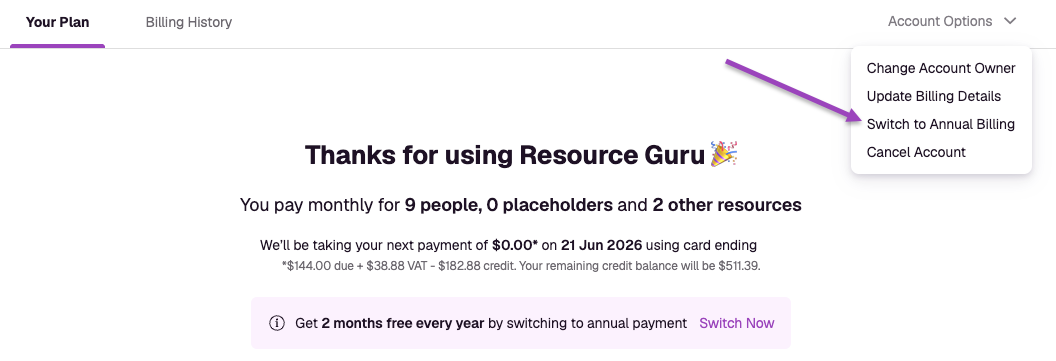
Note: If you’re downgrading to a monthly plan as an annual subscriber, this option will read Switch to Monthly Billing instead. In this case, any payments you’ve already made will be credited to your account and used toward your monthly payments. Once this credit has depleted, we’ll automatically resume monthly charges to the card in your account.
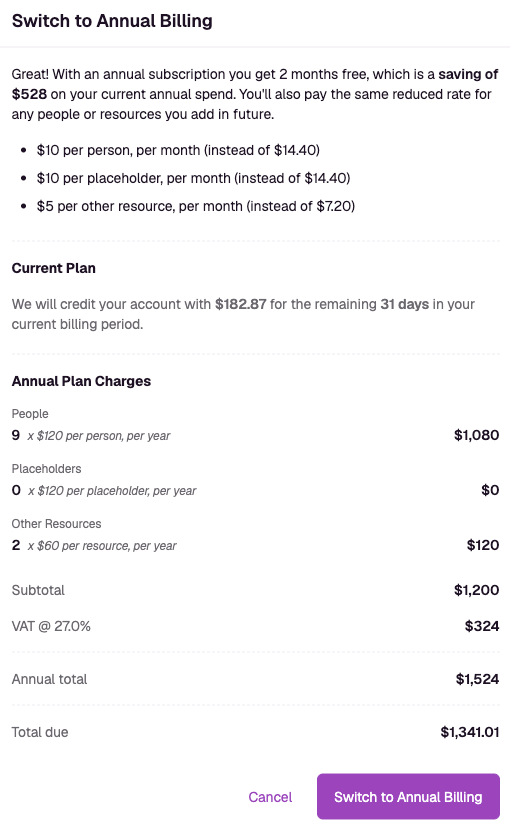
Next, you’ll be shown a breakdown of charges; if you’re happy to continue, click Switch to Annual Billing. You’ll then be emailed an invoice and your account will renew automatically each year, unless you choose to cancel.